

Can Poor Die Cutting Affect Screen Performance?
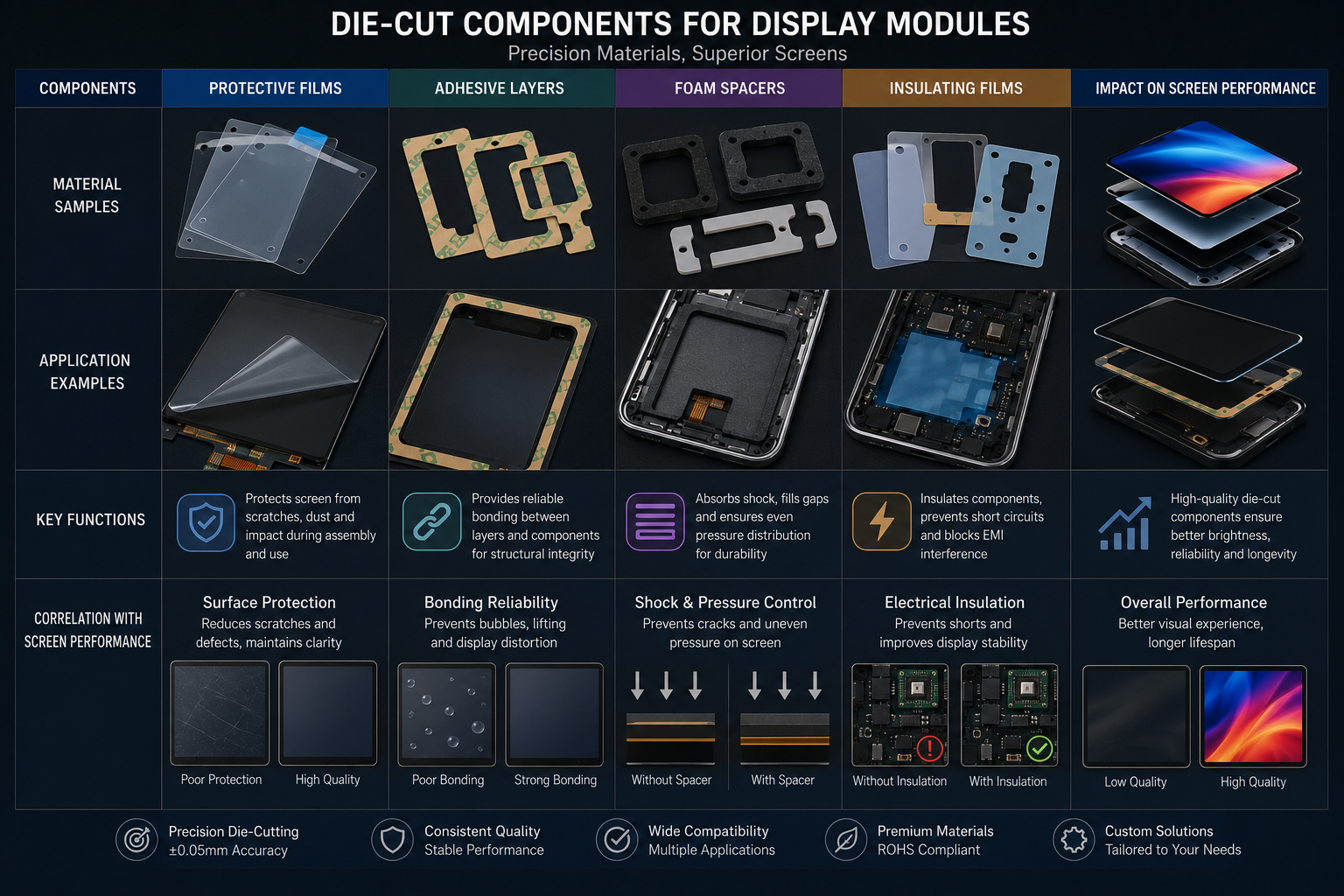
Yes, poor die cutting can affect screen performance. In display modules, touch panels, protective films, optical adhesive layers, foam spacers, and insulation films, a poorly cut component can cause bubbles, pressure marks, light leakage, touch failure, edge lifting, dust contamination, uneven bonding, and visible display defects.
For OEM buyers and display engineers, this is the real risk: the screen itself may not be the problem. The problem may come from a small die-cut film, adhesive gasket, foam spacer, protective liner, or insulation layer that was not converted accurately.
A screen assembly is a stack of sensitive layers. If one layer is cut poorly, the entire display can fail inspection.
The better question is not only “Can poor die cutting affect screen performance?” The better question is: “How can we control die-cut quality before it becomes a display defect, assembly delay, or customer complaint?”
Why Small Die-Cut Parts Matter in Screen Assemblies
Modern screens are thinner, brighter, and more sensitive than before.
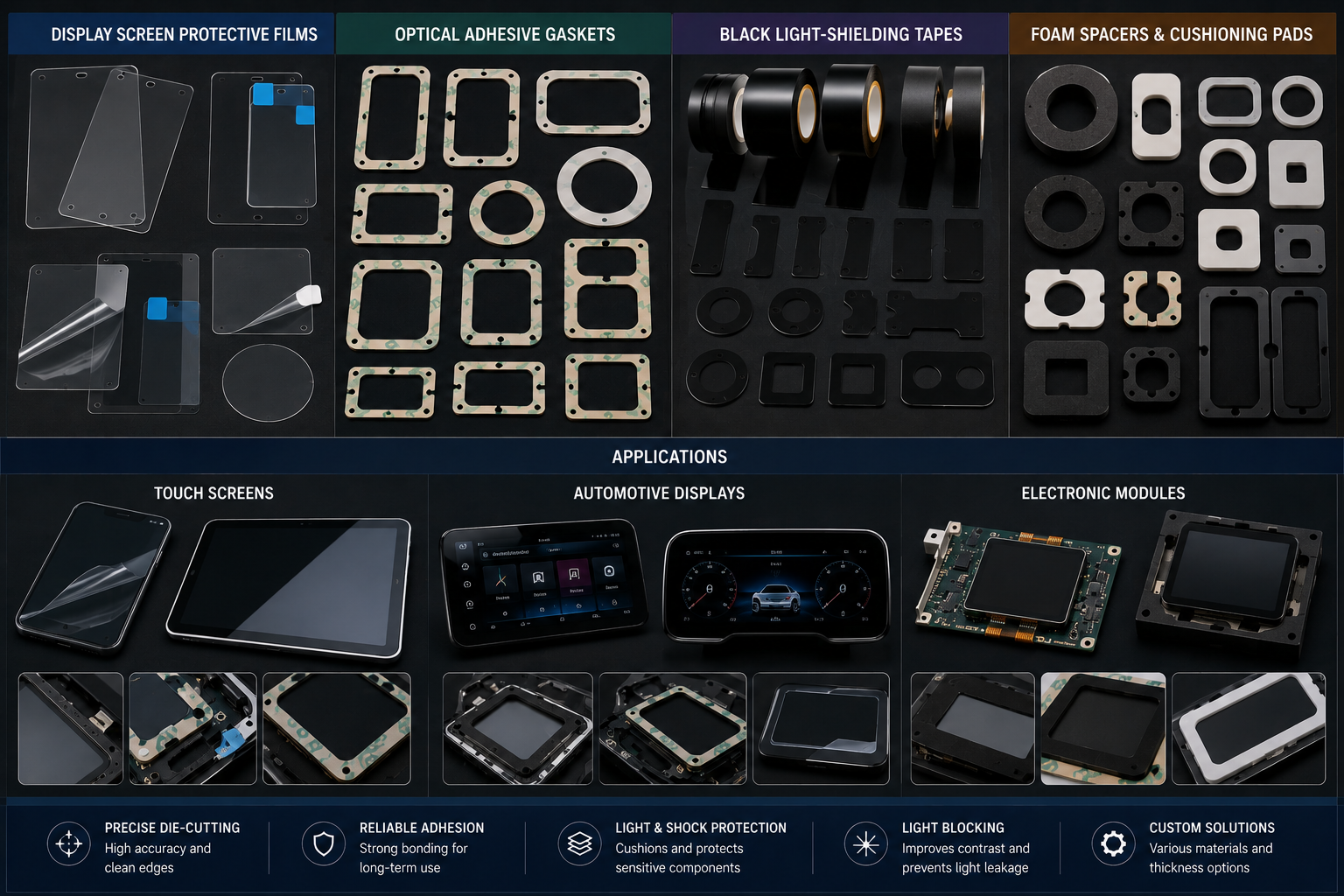
A display module may include:
- Cover glass
- Touch sensor
- Optical adhesive
- Protective film
- PET insulation film
- Foam cushion
- Spacer gasket
- Light-shielding tape
- Dust-proof layer
- Backlight support material
- Housing adhesive
Many of these parts are die cut.
They may look simple, but they control spacing, pressure, light path, bonding, insulation, and cleanliness.
If these small parts are inaccurate, the screen may show defects even when the display panel itself is good.
Common Screen Problems Caused by Poor Die Cutting
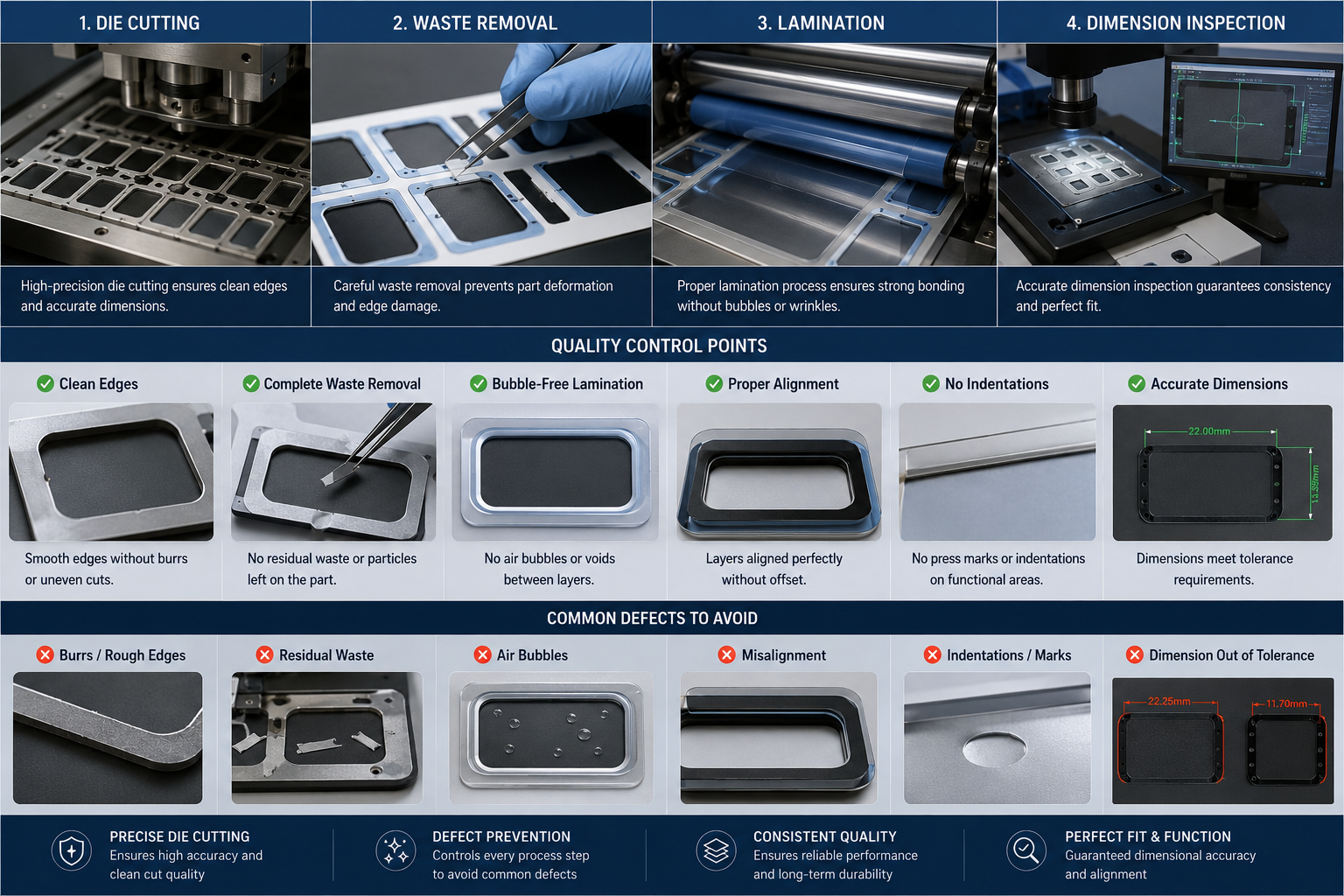
Poor die cutting can create several screen-related failures.
| Die-Cutting Problem | Possible Screen Effect |
|---|---|
| Rough edges | Dust, particles, poor appearance |
| Wrong dimensions | Misalignment or poor fitting |
| Uneven thickness | Pressure marks or display mura |
| Adhesive overflow | Sticking, contamination, assembly difficulty |
| Poor kiss cutting | Difficult peeling or damaged liner |
| Film shrinkage | Edge lifting or misalignment |
| Burrs or debris | Visible spots or optical defects |
| Poor hole accuracy | Sensor or camera window obstruction |
| Weak waste stripping | Deformed parts or adhesive lifting |
For display products, a tiny defect can become very visible.
A small particle may look like a black dot.
A small bubble may become a rejection.
A slight spacer error may create pressure on the LCD or OLED layer.
A misaligned light-shielding tape may affect brightness uniformity.
How Poor Die Cutting Causes Bubbles
Bubbles are one of the most common screen assembly problems.
They may appear during lamination, after storage, or after heat aging.
Poor die cutting can cause bubbles when:
- The adhesive edge is damaged.
- Dust enters between film layers.
- The release liner is cut too deeply.
- The film surface is scratched.
- The part stretches during waste stripping.
- Adhesive wet-out becomes uneven.
- Edge deformation traps air during bonding.
In optical films and protective films, bubble control depends on material cleanliness, adhesive quality, liner quality, and die-cut precision.
If the die-cut edge is rough or contaminated, the film may not bond smoothly.
How Poor Die Cutting Creates Pressure Marks
Screens are sensitive to pressure.
If a foam spacer, adhesive gasket, or protective film is too thick in one area, it may press against the display.
This can create:
- Bright spots
- Dark marks
- Mura
- Uneven color
- Touch response issues
- Glass stress
- Local distortion
Pressure marks are especially risky in thin display modules, wearable screens, automotive displays, and compact electronics.
The problem may not appear during simple visual inspection. It may appear after final assembly, aging, or product use.
This is why thickness tolerance and die-cut consistency must be controlled before mass production.
How Poor Cutting Affects Touch Performance
Touch screens depend on accurate layer alignment and stable spacing.
Poor die-cut parts can affect touch performance by causing:
- Sensor misalignment
- Uneven adhesive thickness
- Local pressure points
- Air gaps
- Edge lifting
- Contamination near touch layers
- Poor grounding or insulation support
If a die-cut insulation film is too small, it may fail to protect a critical area. If a spacer is too thick, it may affect sensor response. If adhesive is uneven, the touch panel may not bond consistently.
For customers, this can create intermittent failures that are hard to diagnose.
The screen may pass one test and fail another. That makes root-cause analysis expensive and slow.
How Die-Cut Dust and Particles Damage Optical Quality
Display assemblies must be clean.
Poor die cutting can generate particles from:
- Dull tooling
- Rough film edges
- Non-woven fiber shedding
- Foam cell tearing
- Adhesive residue
- Poor waste stripping
- Contaminated liners
- Improper packaging
Particles can create visible defects inside the screen stack.
They may appear as:
- Black dots
- White spots
- Surface defects
- Uneven reflection
- Adhesive marks
- Bonding failure points
For optical and display products, clean converting is not optional. It is part of the performance requirement.
Light Leakage and Poor Edge Accuracy
Some display parts are used to block light.
Examples include:
- Black PET tape
- Light-shielding foam
- Black adhesive film
- Backlight frame gaskets
- Camera window gaskets
- Sensor opening films
If these die-cut parts are inaccurate, light may leak through unwanted gaps.
This can cause:
- Uneven backlight
- Bright edge defects
- Display halo
- Sensor interference
- Poor visual quality
- Customer rejection
Light-shielding materials need accurate inner holes, clean edges, stable thickness, and correct positioning.
A small shift can create a visible display problem.
Why Adhesive Die Cutting Is Especially Sensitive
Many screen-related die-cut parts use adhesive backing.
Adhesive helps with fast assembly, but it also increases risk.
Poor adhesive die cutting may cause:
- Edge lifting
- Adhesive overflow
- Liner damage
- Poor peeling
- Part stretching
- Adhesive transfer
- Uneven bonding
- Dust attraction
For kiss-cut adhesive films, the cutting depth must be controlled carefully.
If the cut is too deep, the liner may be damaged and release poorly.
If the cut is too shallow, the part may not peel cleanly.
If the adhesive flows at the edge, it may contaminate nearby screen areas.
For display assembly, adhesive behavior must be reviewed together with film, liner, cutting pressure, and final application surface.
Real Buyer Pain Point: The Defect Appears Late
One of the most expensive problems with poor die cutting is late-stage failure.
The die-cut part may look acceptable at incoming inspection.
But after lamination, screen assembly, pressure bonding, heat aging, or transport, problems appear:
- Bubbles grow.
- Edges lift.
- Foam compresses.
- Film shrinks.
- Particles become visible.
- Touch sensitivity changes.
- Light leakage appears.
At that stage, the cost is much higher.
The customer may need to inspect finished modules, rework assemblies, delay shipment, or replace parts.
That is why screen-related die-cut parts should be validated under real assembly conditions, not only by checking flat samples.
Materials That Need Extra Care in Screen Die Cutting
Different materials create different risks.
| Material | Risk if Poorly Converted |
|---|---|
| PET film | Edge burrs, shrinkage, misalignment |
| TPU film | Stretching, curling, dimensional change |
| Optical adhesive | Bubbles, uneven bonding, outgassing |
| Foam spacer | Compression marks, uneven pressure |
| Black tape | Light leakage if dimensions shift |
| Non-woven layer | Fiber shedding and dust |
| Protective film | Scratches, bubbles, poor peeling |
| Insulation film | Electrical protection failure |
The supplier should understand how each material behaves during cutting, lamination, waste stripping, storage, and assembly.
How to Prevent Screen Problems From Die-Cut Parts
Buyers can reduce risk by confirming key details early.
Review the Full Stack
Do not evaluate one part alone. Review how the die-cut part fits into the full screen structure.
Control Thickness Tolerance
Spacer and adhesive thickness can affect pressure and bonding.
Check Edge Quality
Edges should be clean, stable, and low-particle.
Validate Adhesive and Liner
Peeling, release force, and adhesive wet-out should match the assembly method.
Test After Aging
Heat, humidity, pressure, and storage can reveal hidden problems.
Confirm Packaging
Clean packaging prevents particles from entering the display assembly.
Avoid Overly Fragile Designs
Very narrow strips, sharp corners, and tiny holes may increase die-cutting risk.
What Buyers Should Ask Before Ordering Screen-Related Die-Cut Parts
Before ordering die-cut screen components, buyers should ask:
- What screen function does this part support?
- Does it affect bonding, spacing, insulation, light blocking, or protection?
- What material and thickness are required?
- What tolerance is truly necessary?
- Does the part need adhesive backing?
- Is kiss cutting required?
- Will the part be applied manually or automatically?
- Does the edge need to be low-particle?
- Will the screen face heat, humidity, pressure, or vibration?
- Can the supplier test parts under real assembly conditions?
These questions help prevent small die-cut defects from becoming screen-level failures.
How Sanken Helps Reduce Display Die-Cutting Risk
For display and optical component projects, Sanken Manufacturing focuses on more than cutting shape.
We help customers review material structure, adhesive behavior, tolerance, thickness, liner release, edge quality, and assembly risk.
Our support may include:
- PET and TPU film die cutting
- Optical film converting
- Protective film processing
- Adhesive lamination
- Foam spacer die cutting
- Black light-shielding material converting
- Kiss cutting
- Waste stripping control
- Dimensional inspection
- Prototype and mass production support
The goal is simple: reduce bubbles, edge lifting, pressure marks, dust defects, misalignment, and screen assembly rejection.
Conclusion
Poor die cutting can absolutely affect screen performance. It can cause bubbles, pressure marks, touch response problems, light leakage, dust contamination, edge lifting, and poor assembly fit.
For display modules, optical films, touch panels, camera windows, and electronic screens, die-cut parts must be treated as functional components, not simple accessories. The right material, tooling, adhesive, tolerance, cleanliness, and inspection process can prevent small parts from creating major screen failures.
For OEM buyers, controlling die-cut quality early is one of the most practical ways to improve screen assembly yield, reduce rework, and protect final product performance.